
For the love of all the gods! Please make sure your Showit website is connected to your Google Analytics. Data is the key to understanding your marketing and setting up your Google Analytics only takes a few minutes.
Showit doesn’t have its own analytics tool, but that doesn’t matter anyway because it’s very easy to set up Google Analytics on your Showit website.
In this article, we will provide you with step-by-step instructions on how to add Google Analytics to your Showit website.

How to add Google Analytics to Showit
Step 1: Log in to your Google Analytics account. If you haven’t created an account yet do this now.
Step 2: Type ‘Measurement ID’ in the search bar. Your measurement ID number will appear. It starts with “G-” followed by a unique combination of 10 letters and numbers.
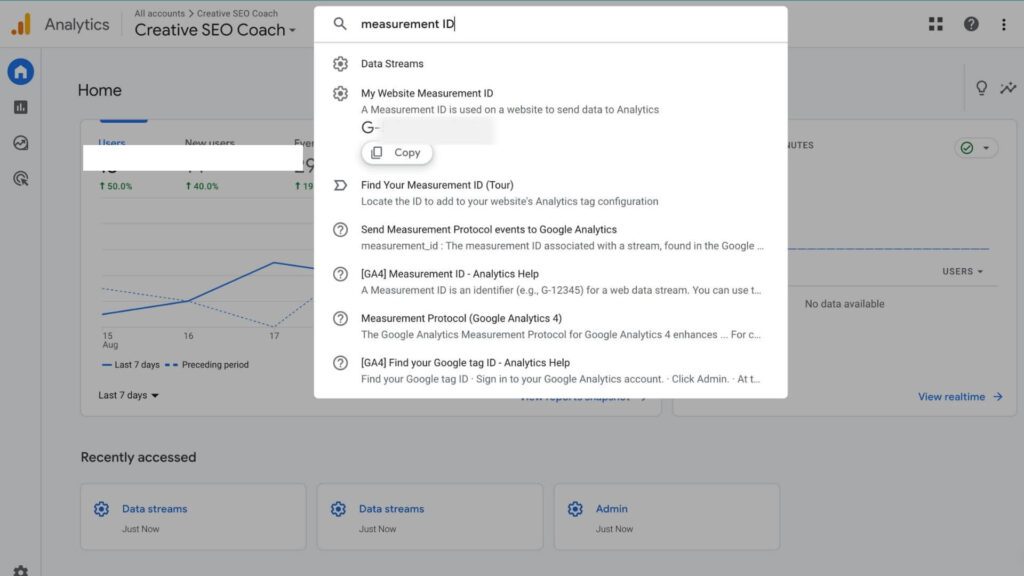
Step 3: Click the ‘Copy’ button
Step 4: Head back to Showit. Go to ‘Site Settings’ in the left-hand navigation panel.

Step 5: Select the “Third-Party” tab. Here, you’ll see the option to add your Google Analytics tracking codes. Paste your GA4 measurement ID.
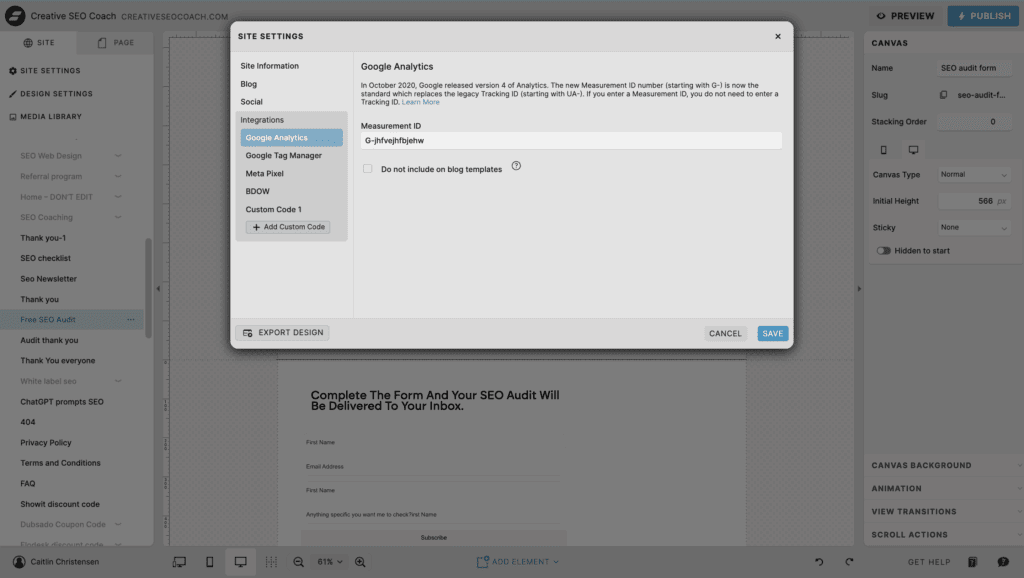
Step 6: Once you’ve added your measurement ID, don’t forget to hit “Close” in the bottom left-hand corner of the pop-up.
Step 7: Click the “Publish” button. You want your changes to go live and start tracking those valuable analytics data.
So there you have it! With Google Analytics set up on your Showit website, you’re ready to dive into the world of data and insights.
🔥 Hot Tip: You can use the Google Analytics mobile app to be able to quickly look at your website data while on the move.
Does Showit offer Analytics?
No, but it’s not necessary. Google Analytics and Google Search Console are both free tools that I’d recommend everyone to use, no matter what website builder they use.
What is Google Analytics?
Google Analytics is a free web analytics service provided by Google.
It allows you to track and analyze various aspects of your website’s performance, such as website traffic, user behavior, conversions, and much more.
With its robust features and user-friendly interface, Google Analytics empowers you to understand your audience, measure the effectiveness of your marketing efforts, and make data-driven decisions to optimize your website’s performance.
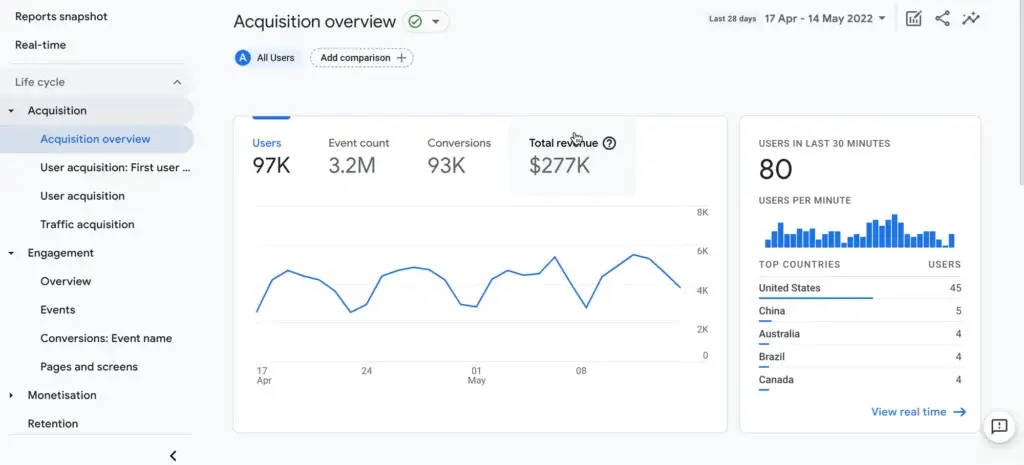
What Can Google Analytics Tell Me About My Website?
Google Analytics can provide a wealth of information about your website, helping you understand how visitors interact with it. Here are some key insights it offers:
- Traffic Data: See how many people visit your site, how they found it (e.g., search engines, social media, direct), and which pages are most popular.
- Audience Insights: Learn about your visitors’ demographics, such as age, gender, and location, as well as their interests and the devices they use.
- Behavior Analysis: Discover how users navigate your site, including which pages they visit, how long they stay, and where they exit.
- Conversion Tracking: Track key actions like form submissions, purchases, or sign-ups to measure your site’s effectiveness in achieving business goals.
- Real-Time Data: Monitor live activity on your site to see current visitor behavior and traffic sources in real-time.
Overall, Google Analytics provides valuable data that can help you make informed decisions to optimize your website, improve user experience, and achieve your business objectives.
Conclusion
Adding Google Analytics to your Showit website is a crucial step in understanding and optimizing your online presence. By following the steps outlined in this guide, you can easily integrate Google Analytics and start gathering valuable insights about your visitors and their behavior. This data will help you make informed decisions to improve your site’s performance, enhance user experience, and achieve your business goals. Now that you know how to add Google Analytics to Showit website, you can confidently set up and utilize this powerful tool to elevate your digital strategy.
Another great tool that Google provides is Google Tag Manager. To learn how to install Google Tag Manager to Showit check out our article.


