
Is Showit good for SEO?
Yes, Showit can be good for SEO.
But, and this is the part people miss, Showit will not magically optimise your website for you.
Showit gives creatives a beautiful, flexible website builder. You can design almost anything you want. That is why so many photographers, designers, coaches and creative businesses love it.
But SEO is not just about having a pretty site.
Search and AI need to read your pages, understand your content and trust that your website deserves to be shown. That means your headings, images, page titles, meta descriptions, links, schema, redirects and technical settings all need to be set up properly.
Showit gives you access to many of those settings.
It does not check that you have used them well.
That is where most Showit SEO problems begin.
So, is Showit good for SEO?
Yes, Showit is good for SEO when it is set up correctly.
Showit gives you control over important SEO elements, including page titles, meta descriptions, URL structures and image SEO settings. It also integrates with WordPress for blogging, which gives Showit users access to one of the strongest blogging platforms available.
So the platform itself is not the problem.
The problem is that Showit gives you a lot of freedom. And freedom creates room for mistakes.
You can build a stunning site with missing alt text.
You can create a beautiful homepage with the wrong heading structure.
You can change a page name and forget to add a redirect.
You can upload huge images that slow everything down.
You can write page titles and meta descriptions without ever seeing how they might appear in search.
That does not mean Showit is bad for SEO.
It means Showit SEO needs to be done properly.

What is Showit?
Showit is a drag and drop website builder.
It is similar to platforms like Squarespace, Wix and Webflow in that it lets you build a website visually, without needing to code.
Where Showit really stands out is design flexibility. You are not locked into rigid blocks or layouts. You can move elements around, layer images, create custom mobile layouts and build a site that looks completely unique.
That is the magic of Showit.
It is also why SEO needs extra care.
The more design freedom a platform gives you, the more important it becomes to check that the final site is still readable for search and AI.
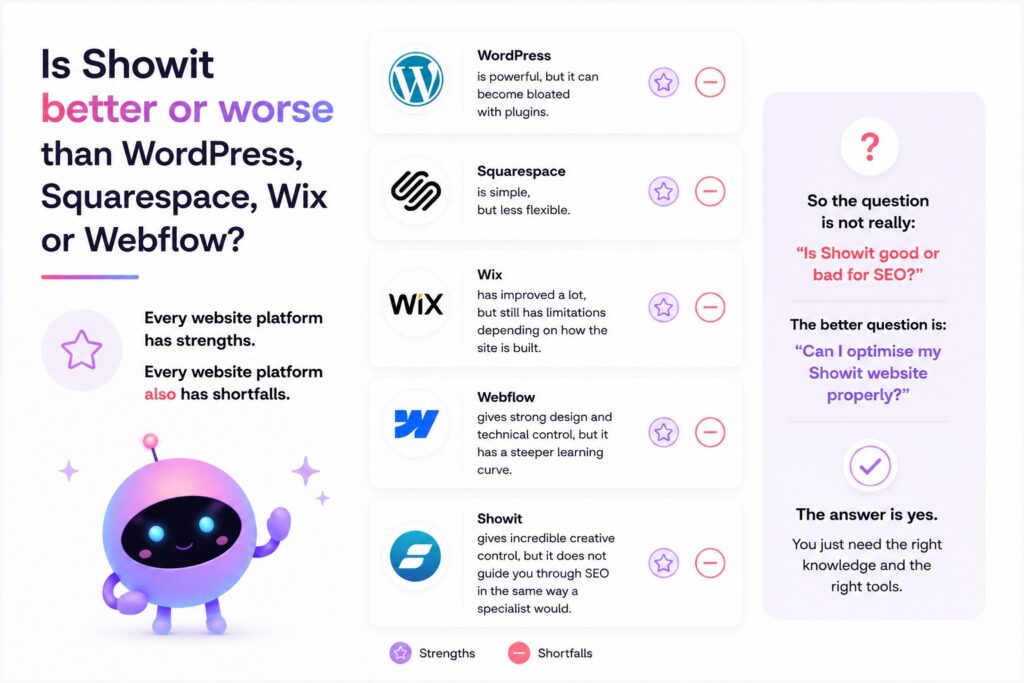
Is Showit better or worse than WordPress, Squarespace, Wix or Webflow?
Every website platform has strengths.
Every website platform also has shortfalls.
WordPress is powerful, but it can become bloated with plugins.
Squarespace is simple, but less flexible.
Wix has improved a lot, but still has limitations depending on how the site is built.
Webflow gives strong design and technical control, but it has a steeper learning curve.
Showit gives incredible creative control, but it does not guide you through SEO in the same way a specialist would.
So the question is not really:
“Is Showit good or bad for SEO?”
The better question is:
“Can I optimise my Showit website properly?”
The answer is yes.
You just need the right knowledge and the right tools.
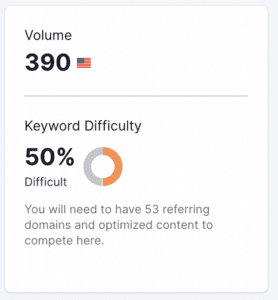
This isn’t an easy keyword to rank for. According to Semrush ‘Luxury Wedding Photographer’ has a difficulty score of 50.
Where Showit is good for SEO
Showit gives you access to many of the SEO basics you need.
You can edit:
☐ Page titles.
☐ Meta descriptions.
☐ URL slugs.
☐ Image titles.
☐ Image alt text.
☐ Heading tags.
☐ Social sharing images.
☐ Redirects.
☐ Google Analytics.
☐ Google Search Console setup.
That is a strong foundation.
For blogging, Showit connects with WordPress. This is a major advantage because WordPress is excellent for publishing long form content, building topical authority and targeting keywords through blog posts.
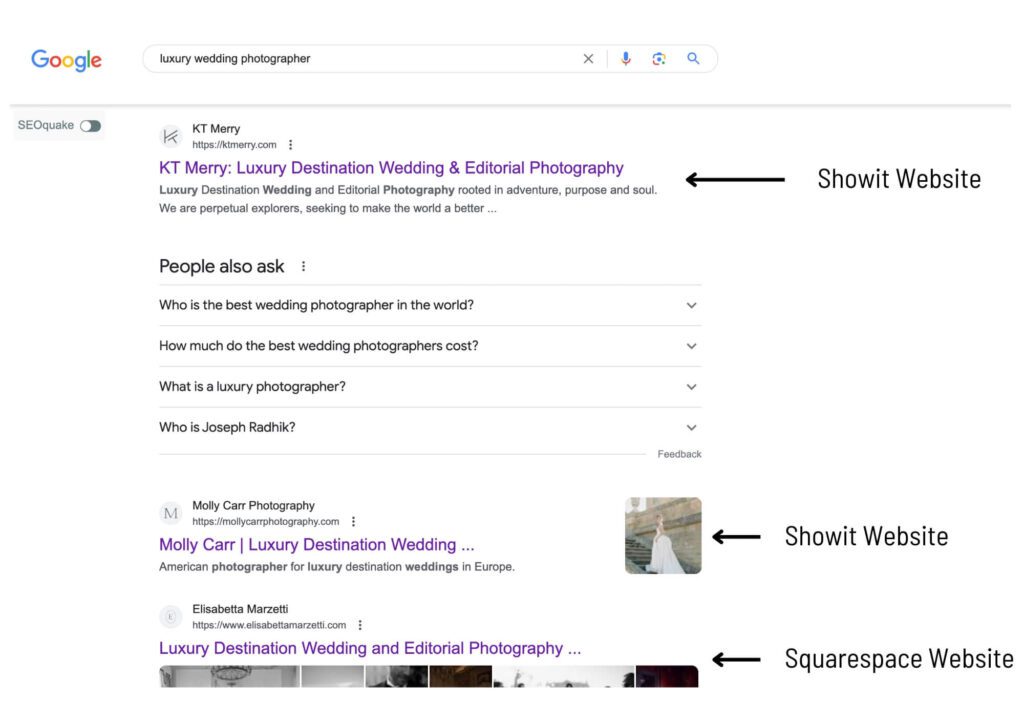
So yes, you can absolutely rank a Showit website.
I have seen Showit websites rank well. I have worked on Showit websites that improved their search visibility. I have seen Showit sites compete in difficult industries.
But the platform alone does not do the work.
The biggest Showit SEO problems
Showit’s SEO issues are not impossible to fix.
But they are easy to miss.
Here are the main ones I see again and again.
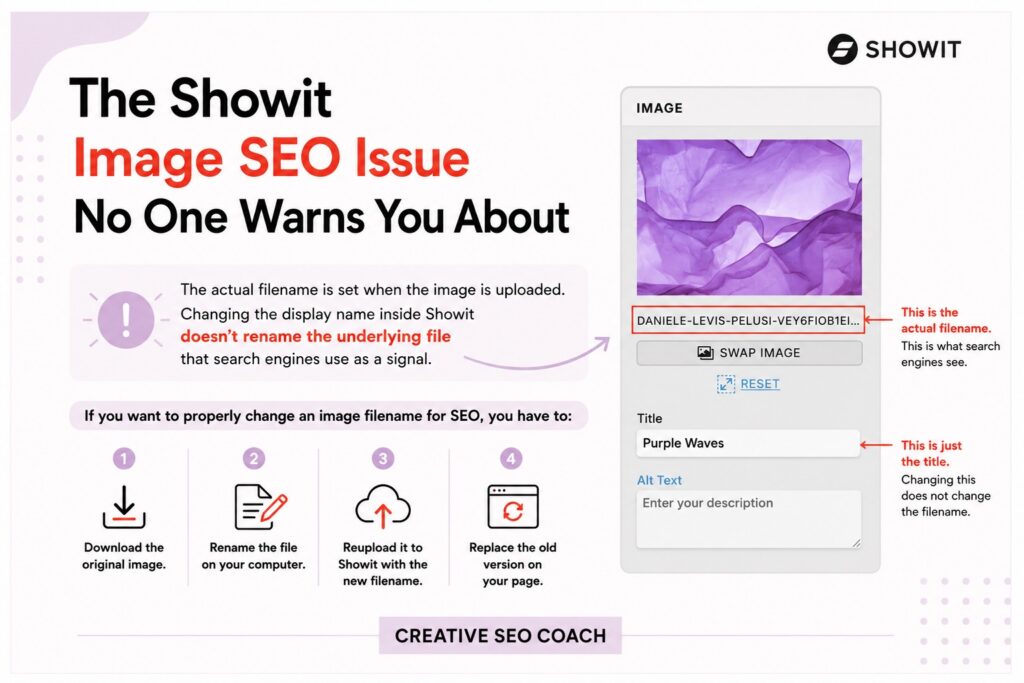
1. Image SEO is frustrating in Showit
This is one of Showit’s biggest SEO pain points.
Showit lets you edit an image title or SEO field inside the platform. That is useful for alt text and image context.
But changing the image name inside Showit does not necessarily change the actual uploaded filename.
If you uploaded an image called:
IMG_4829.jpg
and later realise it should have been:
showit-seo-checklist-example.jpg
you cannot simply type a new filename inside Showit and assume the real file has changed.
To properly change the image filename, you need to rename the file before upload, then reupload it to Showit and replace the old image on the page.
That means:
☐ Download the image.
☐ Rename it on your computer.
☐ Reupload it to Showit.
☐ Replace the old image.
☐ Add the correct alt text.
☐ Check it still displays properly.
For one image, that is annoying.
For 100 images, it is painful.
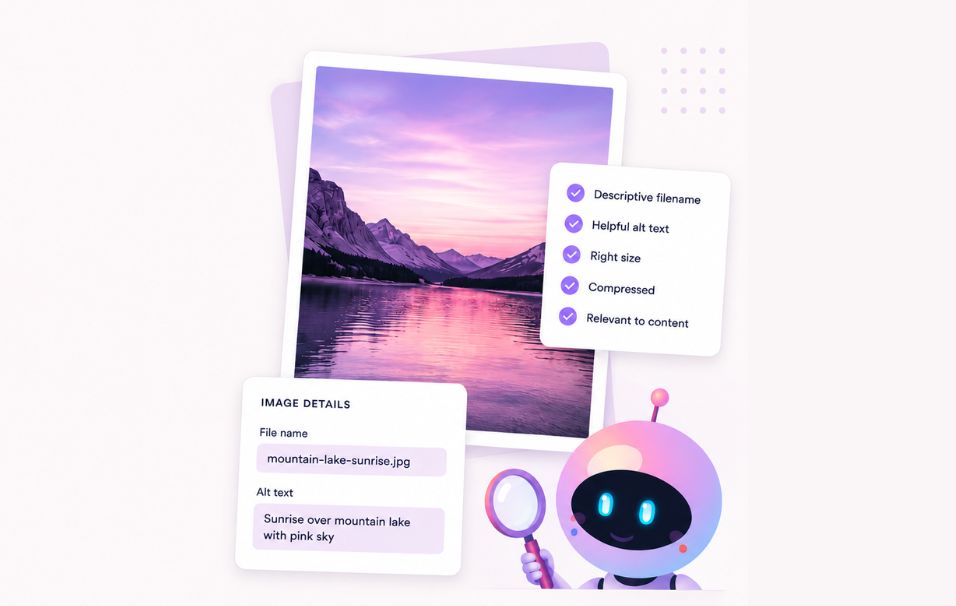
This is one of the reasons I recommend using FastaSEO. It helps you find image SEO issues across your Showit site so you are not manually guessing which images need attention.
2. Big Images can slow your site down
Showit websites are often image heavy.
That makes sense. Showit is popular with photographers, designers and creatives.
But large images can slow your site down quickly.
Showit recommends JPG for most images, PNG only when transparency is needed and GIF only when animation is required. Showit also notes that PNG and GIF files can become large quickly, and its servers do not resize PNG or GIF files in the same way.
So if you upload oversized PNGs everywhere, your site can become heavier than it needs to be.
Good image SEO means your images should be:
☐ Properly sized.
☐ Compressed where needed.
☐ Named descriptively.
☐ Uploaded in the right format.
☐ Given useful alt text.
☐ Not blurry, stretched or oversized.
Your images should look beautiful.
They should not make your site load like it is carrying bricks.
3. Heading order can get messy
The Showit heading layer order issue.
In Showit, it is not enough to visually place your headings in the correct order on the page. You also need to check how those elements are ordered in the Canvas and Layer panel.
Showit builds your page code based on the bottom-to-top order of the elements in the left-hand Canvas panel. That means your heading layers need to be organised correctly in that panel, not just on the visible page.
So there are two parts to fixing your headings in Showit.
First, define each heading correctly.
☐ Your main page heading should be set as H1.
☐ Main section headings should be set as H2.
☐ Subheadings underneath those sections should be set as H3.
☐ Decorative text should not be marked as a heading.
Then, check the layer order.
Your headings should be ordered in the Canvas panel so the page code reads them correctly from bottom to top.
In practical terms, your H1 layer should sit lower in the Canvas panel list than the H2 layers that come after it. Your H2 layers should sit lower than their related H3 layers.
This helps search and AI read the page in the right sequence.
If the page looks perfect visually but the layer order is messy behind the scenes, your code can tell a different story. That makes it harder for bots to understand the structure of your page.
4. Layer order can affect how your page is read
This is a very Showit-specific issue.
Because Showit is a visual builder, your design can look perfect on screen while the underlying order of elements is not ideal.
Search bots do not admire your layout the way humans do.
They read the page structure.
If your layers, headings or text elements are ordered strangely, your page may be harder for bots to understand.
This is not something most generic SEO tools explain well because they are not built specifically for Showit.
FastaSEO was built for this exact kind of problem.
5. You do not get a proper search preview
Showit lets you write page titles and meta descriptions.
That is good.
But it does not give you the same kind of detailed search preview that you might be used to in tools like Yoast, Rank Math or dedicated SEO platforms.
That means you may not realise that your title is too long, your meta description is too weak or multiple pages have similar metadata.
This matters because page titles and meta descriptions help search engines and users understand what your page is about.
They also influence whether someone clicks.
If you are using Showit, I recommend checking your titles and meta descriptions with FastaSEO so you can see what needs fixing before publishing.
6. Showit does not have built-in traffic stats
Showit is a website builder.
It is not an analytics platform.
If you want to track traffic, conversions, user behaviour and search performance, you need to connect tools like:
☐ Google Analytics.
☐ Google Search Console.
☐ Google Tag Manager.
This is not a bad thing.
Most serious websites should be using these tools anyway.
But it does mean you should not launch your Showit site and assume you will automatically know what is working.
You need analytics installed properly.
Otherwise, you are flying blind.
7. Redirects are not automatic when you change pages
If you change a page URL, delete a page or move content, you may need a redirect.
A redirect sends visitors and search engines from the old URL to the new one.
Showit does allow you to create redirects. That is useful.
But you still need to know when to use them.
If you change page names or URLs and forget to create redirects, old links can break. That can hurt user experience and SEO.
Before changing any live URLs, ask:
☐ Is this page already indexed?
☐ Does it have backlinks?
☐ Is it linked from another page?
☐ Do I need a 301 redirect?
A broken link is not just annoying.
It is a missed opportunity.
8. Showit does not automatically create an SEO strategy
This is the part people forget.
SEO is not just settings.
You can have perfect page titles and still not rank if your content strategy is weak.
You still need:
☐ Keyword research.
☐ Strong service pages.
☐ Helpful blog content.
☐ Internal links.
☐ Local SEO where relevant.
☐ Backlinks and authority signals.
☐ Clear website structure.
Showit can support SEO.
It does not replace SEO strategy.
Is Showit bad for SEO?
No.
Showit is not bad for SEO.
But Showit can be bad for SEO when it is used badly.
If your website has huge images, missing alt text, messy headings, weak page titles, no redirects, no analytics and no content strategy, it will struggle.
But that would be true on almost any platform.
Every CMS has shortfalls.
The good thing about Showit’s SEO issues is that most of them can be fixed with the right knowledge and tools.

The best tool for Showit SEO
If you are using Showit, the tool I recommend is FastaSEO.
FastaSEO is the only SEO tool built specifically for Showit.
It was created by an SEO specialist who works with Showit websites, so it understands the problems generic SEO tools miss.
FastaSEO checks your site page by page and helps you find issues such as:
☐ Missing or weak page titles.
☐ Missing or weak meta descriptions.
☐ Image SEO issues.
☐ Oversized images.
☐ Poor filenames.
☐ Missing alt text.
☐ Heading structure problems.
☐ Broken buttons and links.
☐ Missing social sharing images.
☐ Schema gaps.
☐ Showit-specific quirks.
Instead of giving you a giant technical report and leaving you to work it out, FastaSEO shows you what to fix in Showit terms.
Page by page.
Fix by fix.
So, should you use Showit?
Yes, if design flexibility matters to you.
Showit is an excellent choice for photographers, designers, coaches, creative businesses and service providers who want a website that looks custom and feels high end.
But you need to take SEO seriously.
Do not assume your website is optimised just because it looks professional.
A beautiful website can still be invisible to search and AI.
If you use Showit, build the site you want.
Then use FastaSEO to make sure it is properly optimised.
Do Big Businesses Use Showit?
Showit is still a relatively new website building platform but it’s gained traction quite quickly for the amazing flexibility in design that it offers.
A big name in the coaching industry is Jenna Kutcher, her beautiful website was designed by Tonic Website.

Other big businesses that use Showit are the popular blogging website Wit & Design, Baby Sleep Services business Precious Little Sleep, bridal wedding shop, Fabulous Fricks Bridal, and online marketing expert and bestselling author Amy Porterfield—along with many more.
Final verdict: Is Showit good for SEO?
Yes.
Showit is good for SEO when it is set up properly.
It gives you the tools you need, but it does not do the thinking, checking or fixing for you.
The biggest Showit SEO issues, including image optimisation, heading structure, metadata, redirects and analytics, are all manageable with the right process.
And if you want the fastest way to check your site, use FastaSEO.
Your Showit site is beautiful.
Now make sure search and AI can read it.


