
TL;DR
- ChatGPT and other AI search engines don’t answer complex questions with a single search.
- Instead, they break your prompt into multiple smaller searches behind the scenes, a process often called query fanout.
- For example, if you ask for the “best SEO services for photographers”, the AI may separately search for reviews, pricing, comparisons, case studies and company websites before writing its answer.
- This means your content needs to answer related questions and cover topics comprehensively, not just target one keyword.
- Building topic clusters, using clear headings, answering common questions and implementing schema markup can all increase your chances of appearing in AI generated answers.
- The future of SEO is about becoming the best source on a topic, not simply ranking for a single phrase.
Introduction
When you ask ChatGPT a question, it might seem like the answer appears instantly from memory.
In reality, modern AI search works much more like a research assistant. For many queries, ChatGPT and similar AI systems break your question into multiple smaller searches, gather information from different sources and then combine everything into a single response.
This hidden process is often called query fanout.
Understanding how ChatGPT search works can help you create content that’s more likely to be discovered, cited and recommended by AI powered search engines.
What is Query Fanout?
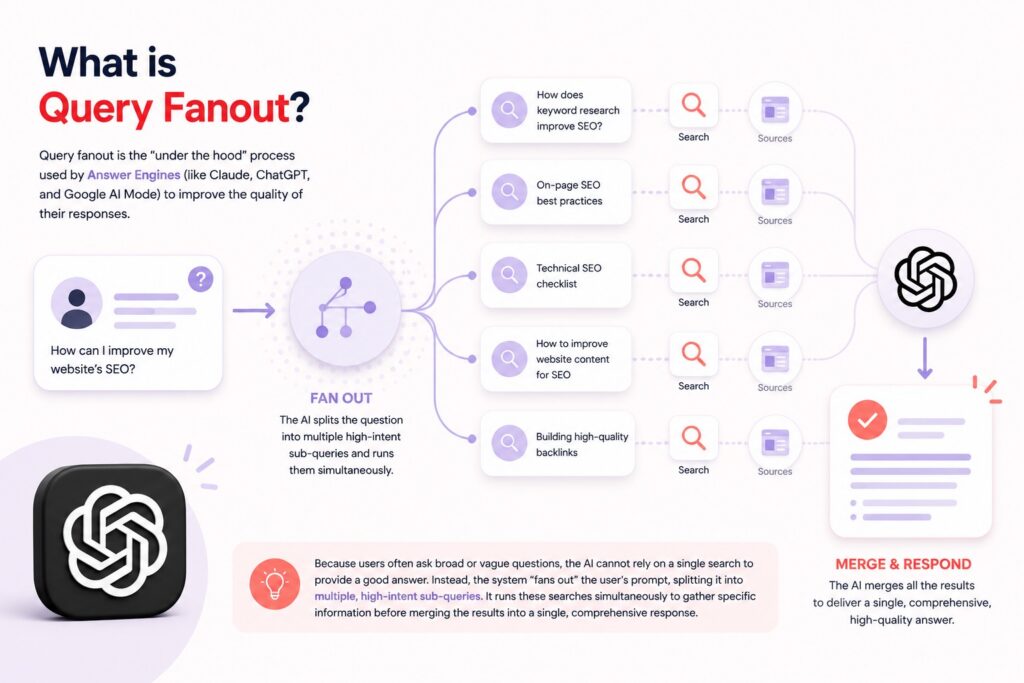
Query fanout is the “under the hood” process used by Answer Engines (like Claude, ChatGPT, and Google AI Mode) to improve the quality of their responses.
Because users often ask broad or vague questions, the AI cannot rely on a single search to provide a good answer. Instead, the system “fans out” the user’s prompt, splitting it into multiple, high-intent sub-queries. It runs these searches simultaneously to gather specific information before merging the results into a single, comprehensive response.
How It Works: A Real-World Example
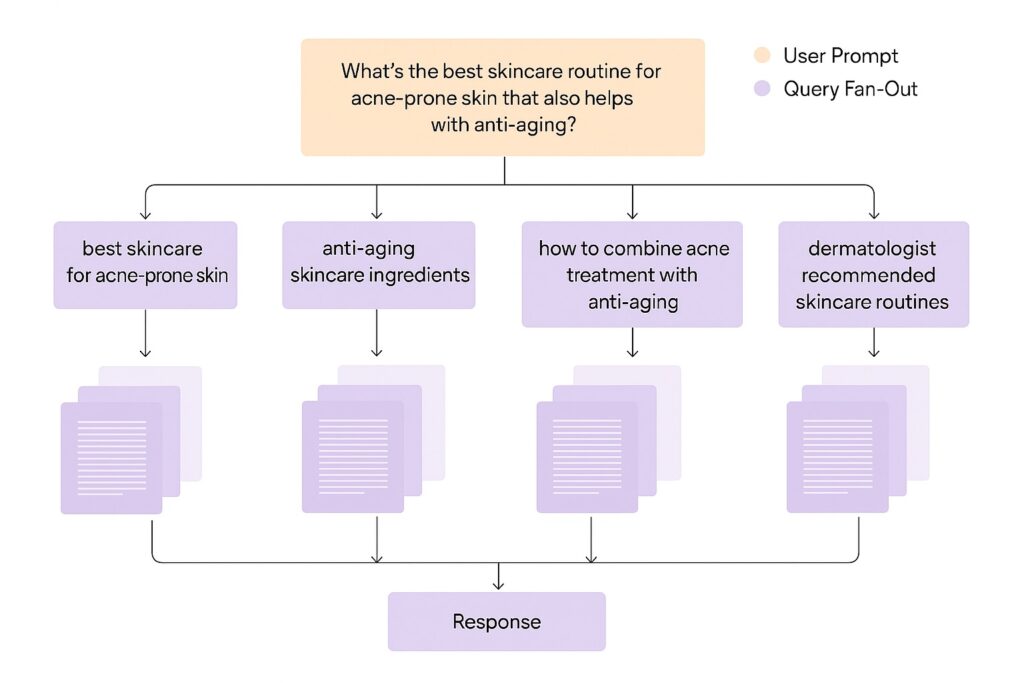
To understand how this works, let’s look at the example shown above.
Imagine a user asks an AI:
“What’s the best skincare routine for acne-prone skin that also helps with anti-aging?”
To an Answer Engine, that single question is not enough on its own. To produce a genuinely helpful response, the model breaks the prompt into multiple focused sub-queries, often called a query fan-out.
Those queries might look like this:
• “best skincare for acne-prone skin”
• “anti-aging skincare ingredients”
• “how to combine acne treatment with anti-aging”
• “dermatologist recommended skincare routines”
Each of these queries targets a different angle of the original question. One focuses on acne, another on aging, another on ingredient compatibility, and another on expert validation.
During this process, the AI often adds intent-refining keywords such as “best,” “recommended,” or “ingredients” to improve accuracy and usefulness. This helps the model pull from authoritative, comparative, and instructional sources rather than surface-level content.
Google uses this same approach in its AI Mode. When it detects a question that requires deeper reasoning, it automatically decomposes the query into subtopics and runs multiple searches behind the scenes. The final answer is then synthesized from all of those results, rather than pulled from a single page or keyword match.
Why Does This Matter?
Here is the uncomfortable truth: You might rank for the user’s original question, but if you don’t rank for the fanout queries, you are invisible.
In the past, you only had to worry about matching the user’s search phrase. Now, you have to worry about the queries the AI generates to do its research. If your content doesn’t answer those specific sub-queries (like “reviews” or “comparisons”), the AI won’t pull your information into its final answer.
By optimizing for query fanout, you increase your chances of earning AI mentions (where the AI names your brand) and AI citations (where it links to your content as a source).

How to Optimize Your Content for ChatGPT
1. Build topic clusters
Instead of publishing one article about a subject, create multiple related pages that cover different aspects in depth.
For example, rather than writing only about “photographer SEO”, also create content on image SEO, blogging, local SEO, Google Business Profile optimisation and keyword research.
2. Use clear headings
AI systems can process content more effectively when it’s organised into logical sections with descriptive headings.
Clear structure also makes your content easier for human readers to scan.
3. Answer specific questions
Include definitions, comparisons, pricing information, step by step instructions and FAQs throughout your content.
These are often the exact pieces of information AI systems are searching for during query fanout.
4. Write in digestible sections
Avoid giant walls of text.
Short, self contained sections make it easier for both readers and AI systems to understand your content.
5. Add schema markup
Schema helps search engines understand exactly what your content represents, whether that’s an article, product, review, FAQ or business.
While it won’t guarantee AI visibility, it makes structured information easier to interpret and surface.
To learn more about ranking for in AI Results. Check out our article How to Transform SEO into AI SEO.
The Bottom Line: What is Query fanout?
Think of an AI Answer Engine like a very diligent college student writing a research paper. If you ask them a question, they aren’t just going to guess; they are going to go to the library and look up five or six different books to find the facts. Query Fanout is that trip to the library. If your content doesn’t appear in those specific books they pull from the shelf, you won’t make it into the final paper.
Frequently Asked Questions
Q: What exactly is a “Query Fanout”?
A: Query fanout is a process used by AI search systems (like ChatGPT, Claude, and Google AI Mode) to answer complex questions. Instead of running just one search based on what you typed, the AI “fans out” your prompt, splitting it into multiple, specific sub-queries. It gathers information for all these sub-queries and merges the results into a single, comprehensive answer.
Q: Why doesn’t the AI just search for exactly what I typed?
A: Often, a single search isn’t enough to provide a high-quality answer. AI models use fanouts to perform “advanced reasoning”. By looking at a request from different angles and breaking it into subtopics, the AI can better satisfy what the user actually wants, even if the user’s original question was broad or vague.
Q: What kind of words does the AI add to my search?
A: The AI attempts to find “high-intent” information. When it fans out a query, it often adds specific keywords to refine the search, such as “best,” “top,” “reviews,” and the current year (e.g., “2025”).
Q: If I rank #1 for a keyword in Google, am I safe?
A: Not necessarily. In the era of AI search, you might rank for the user’s original question, but if your content does not answer the specific “fanout” queries the AI generates behind the scenes, you may be invisible to the model. To appear in the final answer, you need to provide the specific facts and comparisons the AI is looking for during its research phase.
Q: What are “AI Mentions” and “AI Citations”?
A: These are the new goals of SEO.
AI Mentions are when an answer engine names your business or brand directly within its text response.
AI Citations are when the engine provides a link to your content as a source reference alongside its answer.
Q: What is a “Topic Cluster” and why does it help?
A: A topic cluster is a group of interlinked web pages that covers a subject comprehensively. It usually consists of a main “pillar page” giving an overview, connected to “cluster pages” that dive deep into specific subtopics. This structure helps you capture the various sub-queries the AI might generate during a fanout, increasing your chances of being cited.
Q: What does it mean to “write for NLP”?
A: It means writing in a way that Natural Language Processing algorithms can easily read. To do this, you should write in “chunks” (short, meaningful sections), provide direct definitions for new concepts, and use clear subheadings to show how your content is structured. This makes it easier for the AI to extract and summarize your information.
Q: Is “Schema Markup” really necessary?
A: Yes, it is highly recommended. Schema markup allows you to add labels to your website code that tell the machine exactly what your data represents (like labeling a number as a “price” or a “rating”). This helps the AI instantly extract the facts it needs to answer product-related queries.


